Nifty Review: Is It Worth It? (Compared to Monday.com, ClickUp, Asana & Trello)
Disclosure: this review contains affiliate links. If you sign up through them we may earn a commission, at no extra cost to you — see our full disclosure. We only recommend tools we've genuinely evaluated.
The problem: every new hire is a new line item
Project management software has a quiet math problem that only shows up after a team has already committed to a tool. Almost every option in this category prices by the seat — a fixed dollar amount per person, per month — which means the software bill isn’t really a subscription decision, it’s a recurring headcount tax. Hire two more people, and the PM tool’s invoice goes up automatically, on top of everything else that comes with growing a team. Bring on a client or a contractor who just needs to see one project, and the tool either wants a full paid seat for them too, or forces an awkward workaround of sharing a login that wasn’t built for that.
That structure isn’t a flaw exactly — per-seat pricing is simple to understand and scales revenue with usage, which is why most of the category defaults to it. But it does mean the tool that looked affordable in a 6-person pricing demo can look very different once a team is 20 people and still growing, and it means small teams that bring in outside collaborators regularly end up paying for access that isn’t really “using” the product in the way a full-time team member does.
Nifty is built around a different answer to that problem: flat, capacity-based pricing where the bill is set by which tier you’re on, not by how many people you’ve added underneath a headcount cap. Whether that tradeoff actually saves money — and what a team gives up to get it — is the real question this comparison is trying to answer, alongside how Nifty’s actual project-tracking features hold up against Monday.com, ClickUp, Asana, and Trello.
Three things that actually matter when you’re choosing
1. Whether the pricing model matches how the team is actually shaped. A flat-rate plan is a clear win for a team that sits comfortably under a member cap — a 12-person team on a 20-member plan effectively pays the same whether it’s 12 or 20 people using the tool. It’s a worse deal for a team that’s just a few people over a cap, since crossing that line means jumping to the next tier’s full price rather than adding a couple of incremental seats. Per-seat tools are the mirror image: predictable cost-per-person at any headcount, but the bill grows continuously as the team does, with no ceiling.
2. What’s actually included on the free or entry tier, versus what’s gated behind an upsell. Some tools use their free tier as a genuine small-team workspace; others use it as a stripped-down sample that nudges you toward paying quickly. This matters most for a small team or solo user trying to evaluate a tool without committing budget upfront.
3. How guest and client access is priced. For agencies, freelancers, and any team that regularly loops in outside collaborators for a single project, whether guest access is free, capped, or billed like a full seat can change the real cost of the tool more than the sticker price on the main plan does.
What free actually gets you
| Tool | Free tier | What it actually gives you |
|---|---|---|
| Nifty | Yes, permanent | Unlimited members, and every core feature (tasks, milestones, discussions, docs, team chat, dependencies, guest/client access) included — but capped at 100MB storage and 2 active projects |
| Monday.com | Yes, up to 2 seats | 3 boards, docs, and 200+ templates — usable for a very small team, but the 2-seat cap and 3-board limit make it a short-term option rather than a long-term free plan |
| ClickUp | Yes, permanent | Unlimited tasks across 5 Spaces, kanban and calendar views, no seat cap — but only 60MB of total storage, which fills up fast with attachments |
| Asana | Yes, up to 2 users | Unlimited tasks, projects, and list/board/calendar views for a 2-person team — but no timeline view, dependencies, or automation |
| Trello | Yes, up to 10 collaborators per Workspace | Unlimited cards and up to 10 boards per Workspace — genuinely enough for a small team’s entire kanban setup, not just a sample |
Nifty’s free tier stands out for feature completeness rather than headcount — it’s the only one of the five that doesn’t cap the number of people who can use it for free, and it includes features like team chat, docs, and dependencies that some competitors reserve for paid tiers. The real constraint is project count and storage, not who gets to log in.
How they compare on price
| Tool | Entry price | Longer-term option | What it’s really for |
|---|---|---|---|
| Nifty | Pro: $99/mo flat billed monthly (up to 20 members), no per-seat fee | Pro annual: $79/mo flat; Business annual: $124/mo flat (up to 50 members); Unlimited annual: $399/mo flat (unlimited members) | Flat-rate project and portfolio management for teams that want a predictable bill regardless of exact headcount, plus built-in client access |
| Monday.com | Basic: $12/seat/mo billed monthly, 3-seat minimum | Basic annual: $9/seat/mo; Standard annual: $12/seat/mo; Pro annual: $19/seat/mo — each tier adds more automations, dependencies, and integration actions | Highly customizable, visual boards with heavy automation for teams that want to configure workflows without writing code |
| ClickUp | Unlimited: $10/seat/mo billed monthly, no seat minimum | Unlimited annual: $7/seat/mo; Business annual: $12/seat/mo (Business monthly: $19/seat) | An all-in-one workspace combining tasks, docs, whiteboards, and goals for teams trying to consolidate several separate tools into one |
| Asana | Starter: $13.49/seat/mo billed monthly, no published seat minimum | Starter annual: $10.99/seat/mo; Advanced annual: $24.99/seat/mo (Advanced monthly: $30.49/seat) | Structured, opinionated task and workflow management with strong cross-team reporting, popular with marketing and ops teams |
| Trello | Standard: $6/seat/mo billed monthly, no seat minimum | Standard annual: $5/seat/mo; Premium annual: $10/seat/mo (Premium monthly: $12.50/seat); Enterprise: $17.50/seat/mo billed annually ($210/seat/year) | The simplest kanban-board model of the five, best for teams that want boards and cards without a steep configuration curve |
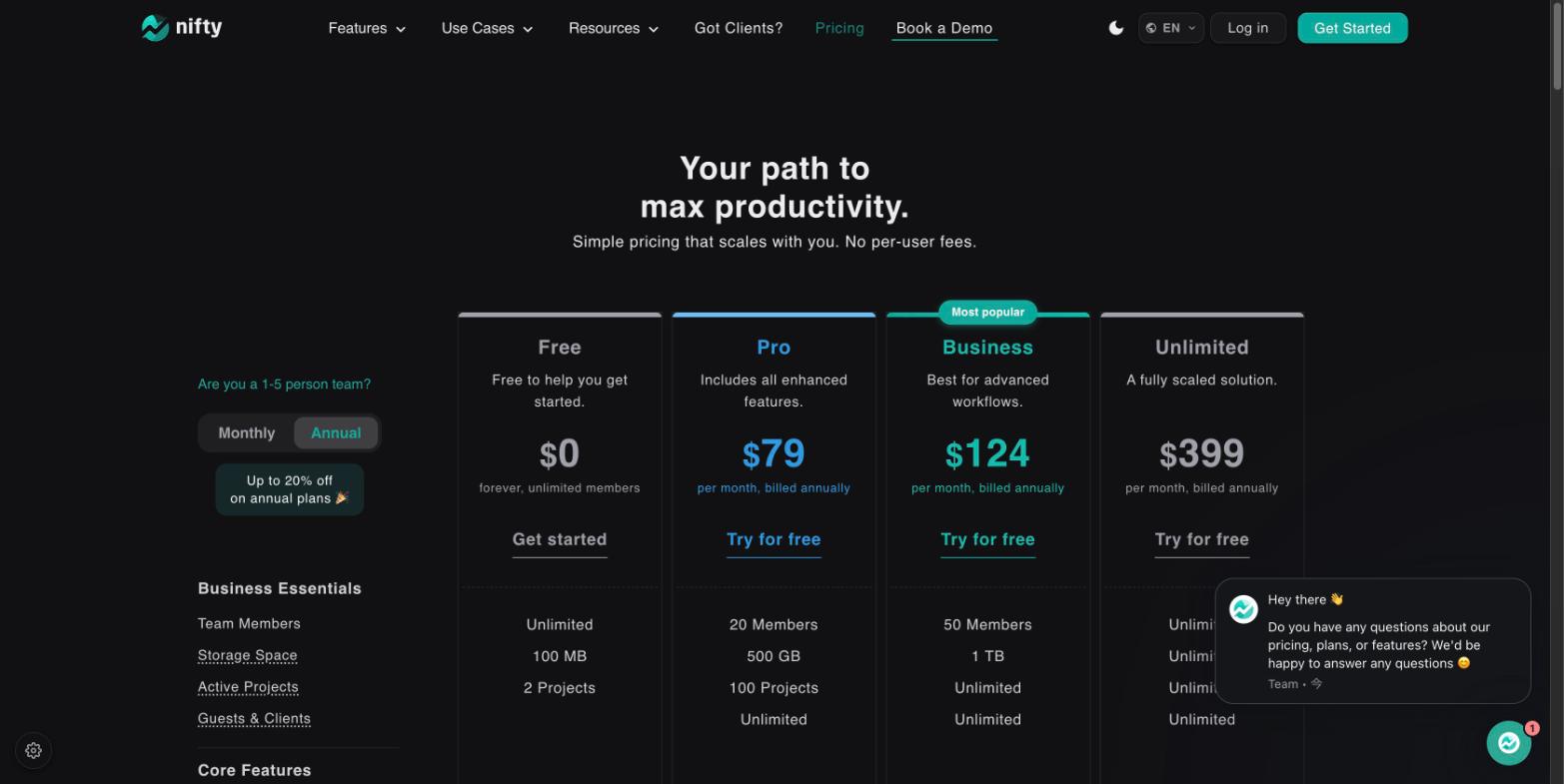
Worth flagging plainly: Nifty’s flat pricing only pays off relative to a per-seat tool once a team’s actual headcount is reasonably close to filling out a tier. A 3-person team on Nifty Pro is paying $79/month flat for capacity it isn’t using, when the same 3 people would cost roughly $27-57/month on most of the per-seat competitors above. The math flips the other direction for a 18-20 person team, where Nifty Pro’s flat $79/month comfortably undercuts nearly every per-seat option in this table.
The breakdown, tool by tool
Nifty
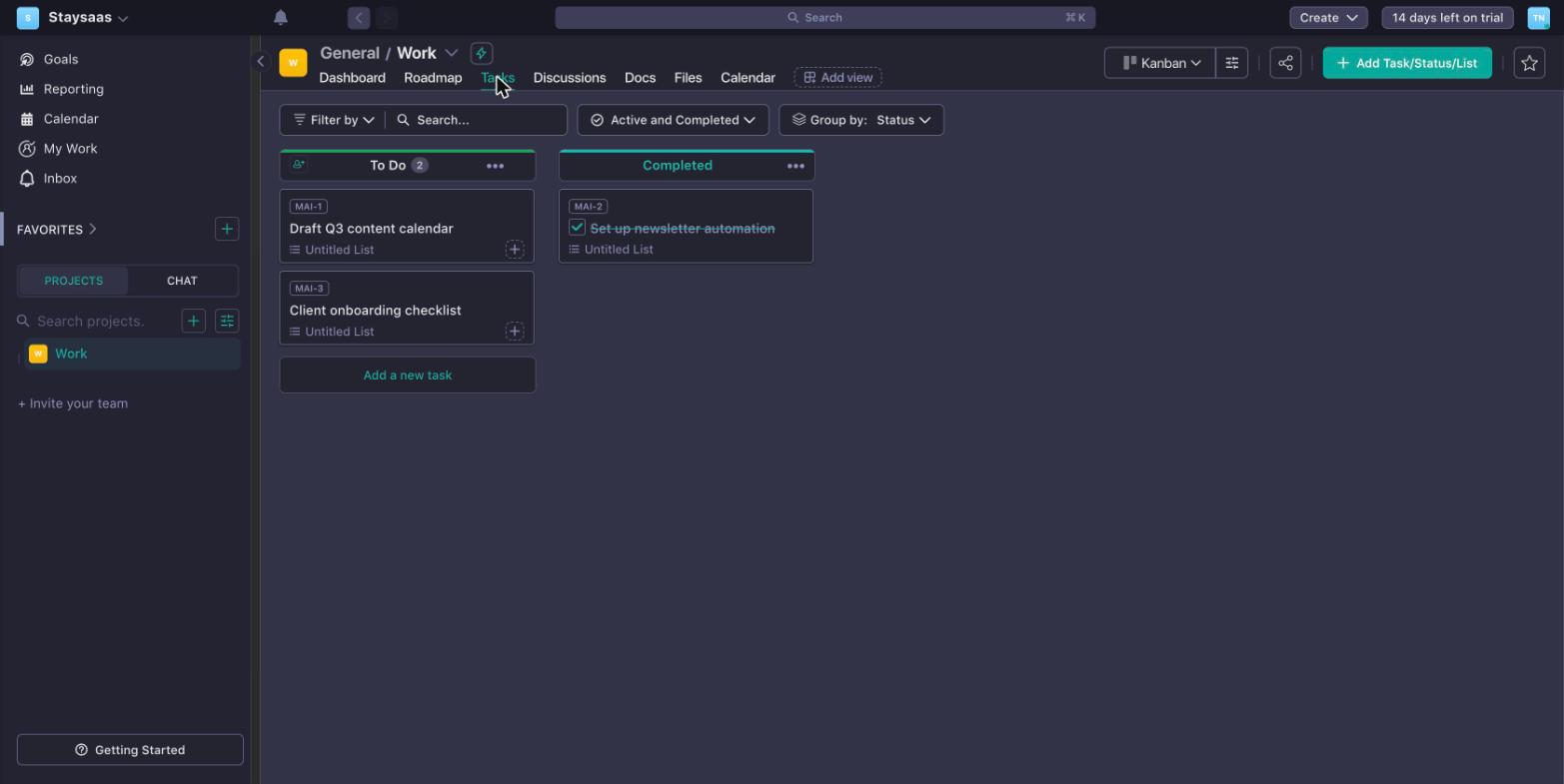
What it’s for: teams that want their PM software bill to stop growing every time they add a person, and that regularly bring outside clients or contractors into a project without wanting to pay for their access.
Pros
- Flat pricing means a team can grow from 12 to 19 people on the same $79/month Pro plan without the bill moving at all, which is a meaningfully different cost curve than any per-seat competitor in this comparison
- Guest and client access is included on every plan, including Free, which removes a real cost for agencies and freelancers who loop outside collaborators into projects regularly
- The free plan doesn’t gate core functionality — team chat, docs, milestones, and dependencies are all available for unlimited members, with capacity (storage, project count) as the only real constraint
Cons
- Flat pricing is a worse deal than per-seat pricing for very small teams or teams sitting just above a tier’s member cap, since crossing that line means paying the next tier’s full price rather than a couple of incremental seats
- Automation and integration depth is thinner than Monday.com’s, which markets no-code automation as its central feature rather than one feature among several
- The two parallel pricing tracks (flat-rate vs. per-seat) take an extra minute to understand compared to competitors that only offer one pricing model, and it’s easy to land on the wrong toggle state on the pricing page and compare the wrong numbers
Monday.com
What it’s for: teams that want a highly visual, color-coded board they can customize without code — status columns, formulas, dependencies, and automations — and are willing to pay a per-seat premium for that flexibility.
Pros
- Automation and integration actions (200 to tens of thousands per month depending on tier) let non-technical teams build genuinely complex workflows without a developer, deeper than what Nifty offers
- Unlimited viewer seats on every paid plan mean stakeholders who only need to check status don’t add to the per-seat bill
- The same underlying platform extends into dedicated CRM, dev, and service products, so a team that outgrows basic task tracking can add a module without switching systems entirely
Cons
- The 3-seat minimum on every paid plan is a real cost for very small teams, and per-seat pricing means the bill keeps climbing as the team grows, unlike Nifty’s flat tiers
- Standard and Pro plans meter AI features as a separate credit purchase on top of the seat price, which is an easy line item to miss when comparing sticker prices
- The heavy customization that makes Monday.com powerful also means new teams often need real setup time before the board layout matches how they actually work, rather than working well out of the box
ClickUp
What it’s for: teams trying to replace several separate tools (task tracker, docs, whiteboard, goal tracking) with one subscription, and comfortable with a steeper initial learning curve in exchange for that consolidation.
Pros
- The free tier is permanent and has no seat cap, similar to Nifty’s approach, though ClickUp’s 60MB storage limit is tighter than Nifty’s 100MB
- Unlimited plan starts at the lowest per-seat entry price of the per-seat tools here ($7/seat/mo annual), with Business adding advanced dashboards and automation at $12/seat/mo annual
- Docs, whiteboards, and goal-tracking are built into the same workspace as tasks, rather than requiring separate apps or add-ons
Cons
- Being per-seat, the bill still grows with every hire, unlike Nifty’s flat tiers — a fast-growing team won’t see the cost predictability Nifty offers
- Upgrades apply at the workspace level — every member moves to the paid tier together, so a team can’t mix free and paid seats to control cost
- The breadth of features (tasks, docs, whiteboards, goals, chat, AI) that makes ClickUp an all-in-one option is also the most commonly cited source of a steep learning curve for new users
Asana
What it’s for: cross-functional and marketing-style teams that want a structured, opinionated tool with strong reporting, rather than a fully freeform board they configure themselves.
Pros
- The Starter and Advanced plans both include a 30-day free trial, longer than Nifty’s 14-day trial on its paid tiers, giving more time to test a real workflow
- Workflow Builder and goal-tracking give teams a structured way to connect day-to-day tasks to larger objectives
- The interface is consistently cited as one of the cleaner, less cluttered options in this group, which shortens onboarding time for non-technical teams
Cons
- Advanced plan pricing ($24.99/seat/mo annual, $30.49/seat/mo monthly) climbs quickly for a mid-sized team, with no flat-rate alternative the way Nifty offers
- The free Personal plan caps out at 2 users, the same tight ceiling as Monday.com’s free tier, so it stops being usable the moment a third person needs access
- Guest access isn’t a standout feature the way it is on Nifty’s plans, which matters for teams that regularly bring in outside clients
Trello
What it’s for: small teams or individuals who want the simplest possible kanban board — cards moving across lists — without needing dependencies, automation rules, or heavy configuration.
Pros
- The lowest entry price of the per-seat tools here ($5/seat/mo annual on Standard, $6/seat/mo monthly), the most budget-friendly paid option for a very small team
- The free tier supports up to 10 collaborators and 10 boards per Workspace, enough for a small team’s actual day-to-day kanban setup rather than a capped sample
- The card-and-list model has the shortest learning curve of any tool in this comparison, including Nifty — a new hire can understand a Trello board within minutes
Cons
- The simplicity that makes Trello easy to learn is also a real ceiling for complex projects — dependencies, milestones, and detailed reporting are much thinner than on Nifty or Monday.com
- Enterprise-tier pricing ($17.50/seat/mo billed annually, $210/seat/year) is a steep jump from Premium, and still scales per seat rather than flattening out the way Nifty’s Unlimited plan does
- Teams that outgrow Trello’s simplicity often migrate to a more structured tool like Nifty or Monday.com rather than Trello adding that complexity itself
Which one fits your situation
Team of roughly 12-20 people, headcount likely to keep growing: Nifty Pro is the strongest fit in this comparison — the flat $79/month (annual) stays flat as the team fills out the 20-member cap, which no per-seat tool here can match at that size.
Agency or freelance team that regularly brings clients into projects: Nifty’s free or included guest access on every tier removes a cost that Monday.com, ClickUp, Asana, and Trello don’t handle the same way, on top of the flat-rate benefit if the internal team is mid-sized.
Very small team (2-5 people) or a team that expects to stay small: a per-seat tool likely costs less in absolute terms — Trello’s Standard plan or ClickUp’s Unlimited plan will usually undercut Nifty’s flat Pro tier for a team this size, though Nifty’s per-seat pricing track ($10-16/member/mo annual) is worth comparing directly against those two before deciding.
Want heavy no-code automation and don’t mind per-seat billing: Monday.com’s Standard or Pro tier remains the deepest automation platform of the five, worth the premium if workflow automation is the primary requirement.
Need structured workflows and strong cross-team reporting, especially for marketing or ops: Asana, using the 30-day trial on Starter or Advanced to test the real workflow before committing to a plan.
Not sure which pricing model fits, and want to test before spending anything: Start with Nifty’s free plan and Trello’s free plan in the same week — one shows what a flat-rate, feature-complete free tier looks like, the other shows the simplest possible per-seat board. Between the two you’ll get a real feel for whether your team’s size and growth trajectory favors flat or per-seat pricing before paying for either.
Common questions
Does Nifty really have no per-user fee? On its flat-rate plans, yes — Pro, Business, and Unlimited each have a fixed monthly price covering up to a set number of members (20, 50, and unlimited respectively), with no additional per-seat charge inside that cap. Nifty also offers a separate per-seat pricing track for teams of 1-5 people who’d rather pay per member than jump to a flat tier, so the choice of pricing model is up to the team, not fixed by the plan itself.
Is Nifty’s free plan actually usable, or just a demo? It’s a real working plan: unlimited members, and every core feature (tasks, milestones, discussions, docs, team chat, dependencies) is included, not gated behind a paid tier. The catch is capacity, not features — 100MB of storage and 2 active projects, which is workable for one small ongoing project but tight the moment a team is running several at once.
Can clients or external guests access a Nifty project without paying for a seat? Guest and client access is included on every plan, including Free. This is a meaningful difference from tools that charge for any account with access, and it matters most for agencies or freelancers who regularly bring outside clients into a project for status updates or approvals.
How does Nifty’s flat pricing compare in total cost to a per-seat tool as a team grows? It depends entirely on team size relative to the plan’s member cap. A 15-person team on Nifty Pro pays $79/month flat (annual billing) — well under what 15 seats would cost on most per-seat competitors in this comparison. A 22-person team, just over the Pro cap, has to jump to Business at $124/month, which is a bigger step than adding two more per-seat licenses would be on a tool like ClickUp or Trello. The flat model rewards teams that fit cleanly under a cap and penalizes teams that sit just above one.
Does Nifty support the same automation and reporting depth as Monday.com? Not quite — Monday.com’s automation and integration actions are more extensive and more heavily marketed as the platform’s core strength. Nifty’s automation (workflow automations, recurring tasks, automatic check-ins) covers the common cases but isn’t positioned as a no-code automation platform the way Monday.com is. Teams whose primary need is complex, highly customized automation should weigh that gap against the pricing difference.
Where to start
The fastest way to tell whether Nifty’s pricing model actually works in your favor is to do the arithmetic against your real headcount before signing up for anything — not the demo team size, the actual number of people (and outside clients, if relevant) who’d be using the tool day to day.
Nifty’s free plan and 14-day trial on the paid tiers only need a work email to start, which is enough to run one real project through a normal week and see whether the flat pricing, guest access, and feature set hold up against how your team actually plans work. If the flat-rate model doesn’t end up fitting your team’s size, Trello’s free tier is worth testing in the same sitting as the simplest per-seat alternative — between the two you’ll have a genuine read on which pricing model actually saves money for your specific team, rather than guessing from a pricing page alone.