Monday.com Alternatives: 5 Project Management Tools Worth Comparing
Disclosure: this page contains affiliate links. If you sign up through them we may earn a commission, at no extra cost to you — see our full disclosure. We only recommend tools we've genuinely evaluated.
Why teams go looking for a Monday.com alternative
Most teams don’t leave Monday.com because the product is bad — its boards, automations, and integrations are genuinely capable, which is why our own review of it rates it well for the teams it fits. They go looking because of three specific, recurring friction points that only show up after a team is already committed: the 3-seat minimum on every paid plan, which charges a 2-person team for a seat nobody’s using; the per-seat price that climbs from $9 to $12 to $19 a month as a team needs more automation depth, with AI features metered as a separate credit purchase on top of that; and the setup time a highly customizable board layout demands before it actually matches how the team plans work, rather than working well by default.
A six-person team that signed up for Monday.com’s free trial expecting a quick kanban board is a common version of this story. Two weeks in, they’re happy with the boards but discover the jump to a paid plan bills for three seats minimum even though they’re six people split across two smaller pods, the automation they assumed was included is capped and needs an add-on for the volume they actually run, and someone has spent most of a Friday afternoon rebuilding a status-column formula that broke when a teammate renamed a group. None of that means Monday.com is the wrong tool in general — it means it’s worth checking whether an alternative removes the specific friction that sent the team looking, rather than just moving the same structure to a different logo.
Three things worth checking before you switch
1. Whether the alternative actually removes your specific pain point. A seat-minimum problem isn’t solved by moving to another tool that also has one. Check the actual mechanism causing the friction — seat minimum, per-seat cost at your real headcount, or metered automation — against how the alternative you’re considering handles that exact thing, not just its overall reputation.
2. How much of the current setup has to be rebuilt by hand. Board structure and task data usually move over through CSV import. Automations, dependency chains, and custom column formulas generally don’t migrate automatically on any of the tools below, so switching mid-project means budgeting real time to rebuild the workflow logic, not just the task list.
3. Whether the team was actually using Monday’s automation depth, or paying for headroom it never touched. Monday.com’s automation and integration actions are the deepest of any tool in this comparison. A team that was only using recurring tasks and simple status triggers can usually move to a lighter, cheaper tool without losing anything it was actually using day to day; a team running complex multi-step automations across boards will feel that gap more on any of the alternatives here.
How the alternatives compare on price
| Tool | Entry price | Longer-term option | Seat minimum |
|---|---|---|---|
| Monday.com | Basic: $12/seat/mo billed monthly | Basic annual: $9/seat/mo; Standard annual: $12/seat/mo; Pro annual: $19/seat/mo | 3 seats, every paid plan |
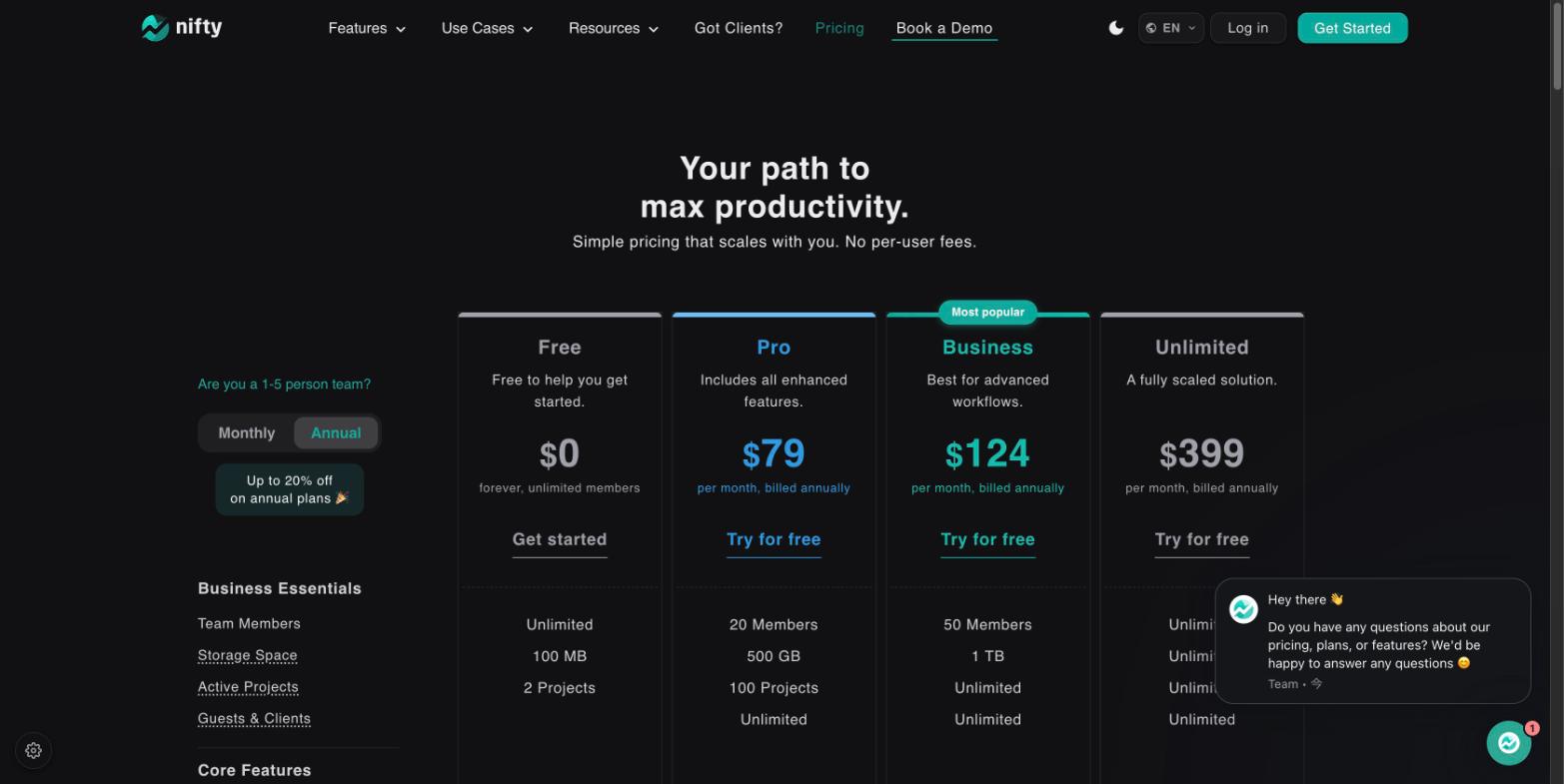
| Nifty | Pro: $99/mo flat billed monthly (up to 20 members) | Pro annual: $79/mo flat; Business annual: $124/mo flat (up to 50 members) | None |
| Paymo | Solo: $5.90/mo (first 3 months, then $9.90/mo) | Plus annual: $10.90/user/mo (first 3 months, then $15.90/user/mo) | None |
| ClickUp | Unlimited: $10/seat/mo billed monthly | Unlimited annual: $7/seat/mo; Business annual: $12/seat/mo | None |
| Asana | Starter: $13.49/seat/mo billed monthly | Starter annual: $10.99/seat/mo; Advanced annual: $24.99/seat/mo | None published |
| Trello | Standard: $6/seat/mo billed monthly | Standard annual: $5/seat/mo; Premium annual: $10/seat/mo | None |
Monday.com is the only tool in this table with a published seat minimum, and its per-seat price climbs the furthest between entry and top tier of any option here. That gap is exactly what sends teams looking in the first place — but it’s worth reading the two picks below against your actual situation rather than assuming either one is a drop-in replacement.
The two worth a closer look
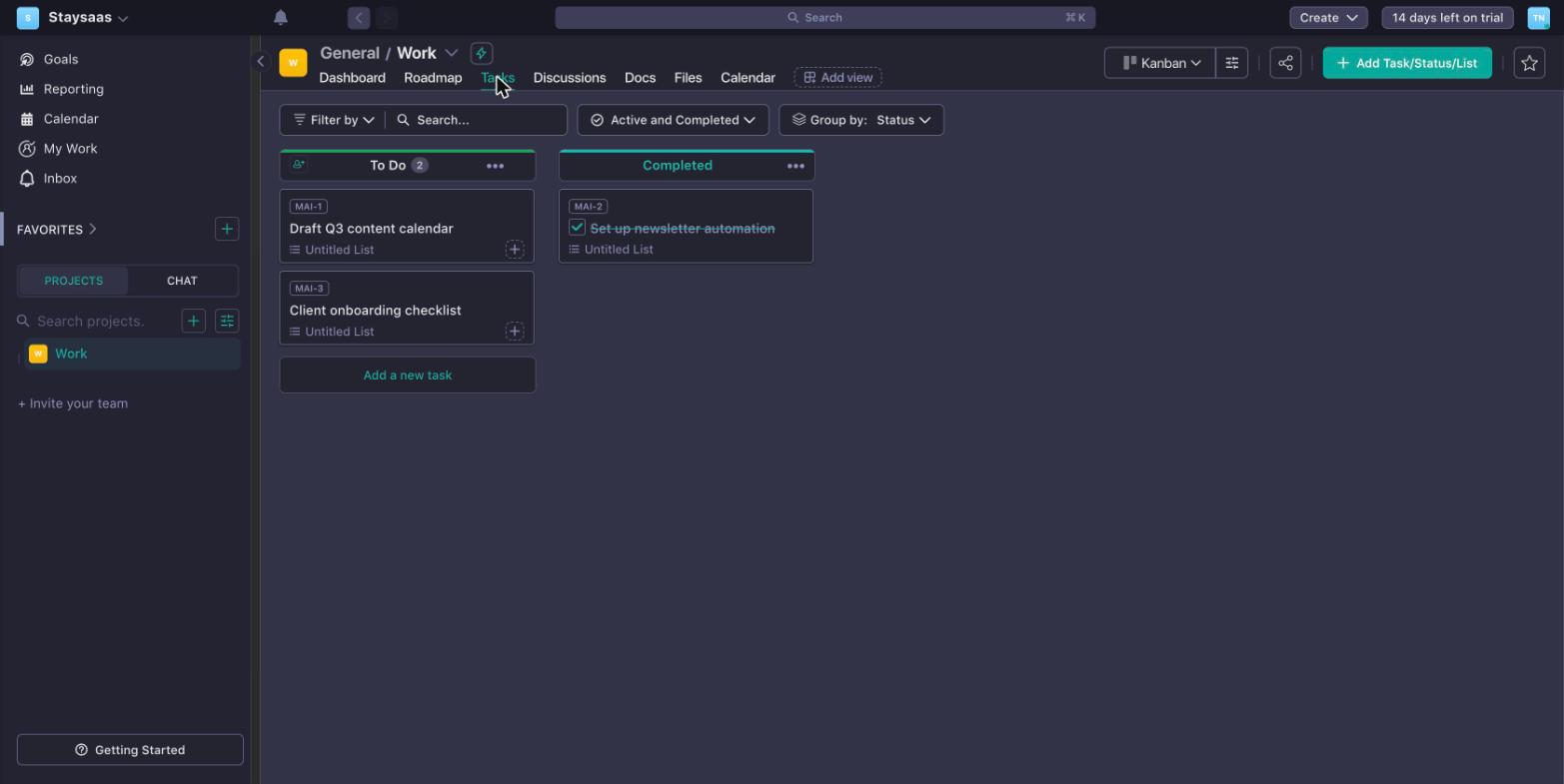
Nifty
What it’s for: teams leaving Monday.com specifically over the seat minimum or a per-seat bill that keeps climbing — Nifty’s flat pricing means the bill stops moving once a team fits under a tier’s member cap, and there’s no minimum penalizing a small team.
Pros
- No seat minimum and no per-seat pricing at all on its flat tiers — a 6-person team pays the same $79/month (annual) as a 19-person team on the same Pro plan, the opposite of Monday.com’s climbing per-seat cost
- Guest and client access is included on every plan, including Free, with no extra charge — useful for teams that bring outside collaborators into a project the way Monday.com’s viewer seats only partly cover
- The free plan doesn’t gate core functionality (tasks, milestones, docs, team chat, dependencies) behind a paid tier the way Monday.com’s 2-seat free plan gates automation and advanced views
Cons
- Automation and integration depth is thinner than Monday.com’s — teams that were genuinely using Monday’s deeper automation, not just recurring tasks, will feel this gap
- Flat pricing is a worse deal than a per-seat tool for a team sitting just above a tier’s member cap, since crossing that line jumps to the next tier’s full price
- CSV import brings over task data but not automations or dependency chains, so the more customized a current Monday.com setup is, the more manual rebuilding is needed either way
Paymo
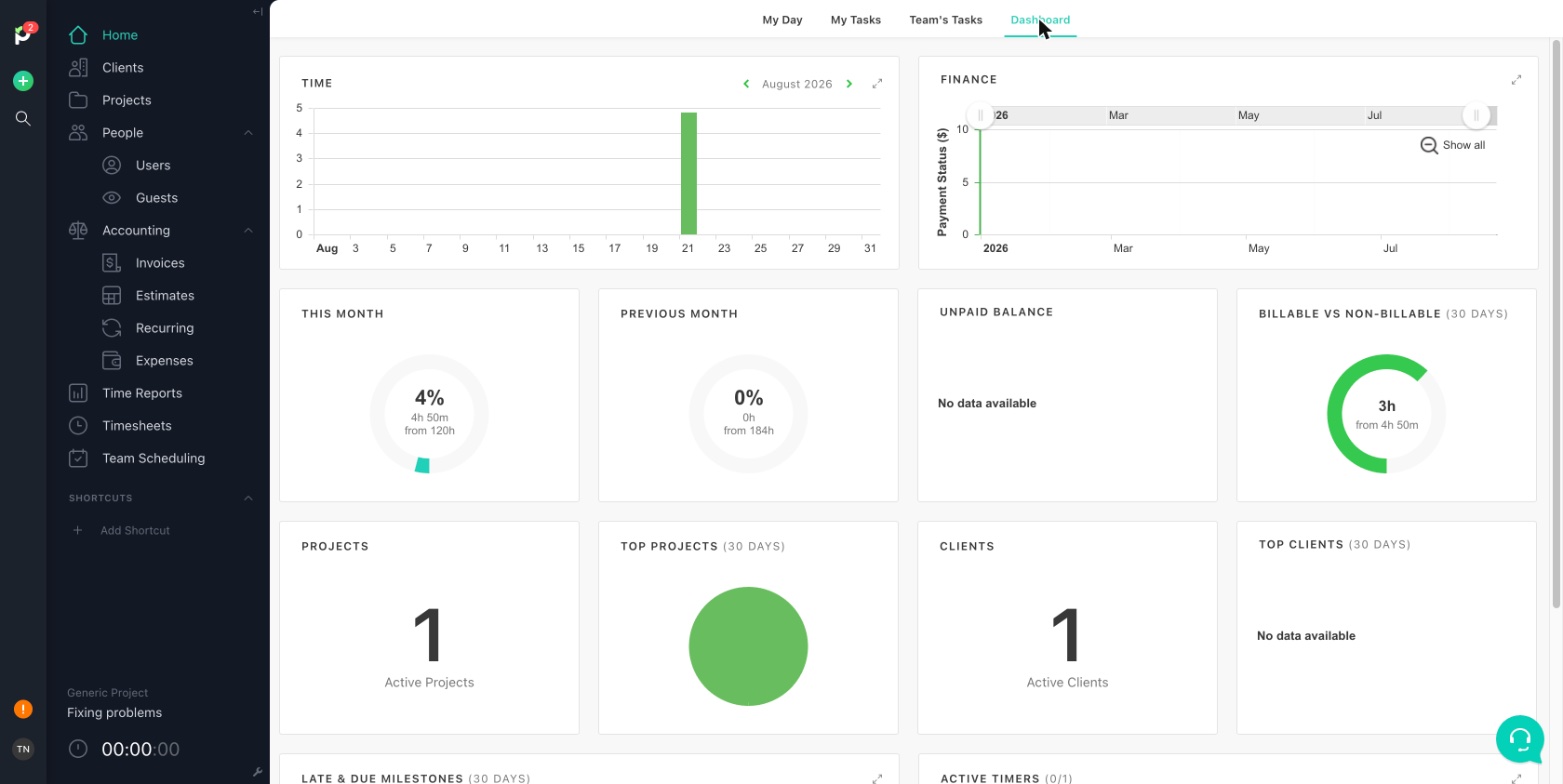
What it’s for: freelancers and small agencies leaving Monday.com because they’ve also been paying for a separate time-tracking and invoicing tool — Paymo folds project management, time tracking, and client invoicing into one subscription, which Monday.com doesn’t do natively.
Pros
- Invoices generate directly from tracked billable hours, no export-and-reimport step into a separate accounting tool — a genuine consolidation Monday.com doesn’t offer on its own
- No seat minimum, and the Solo plan is built for exactly one user, which fits a freelancer better than Monday.com’s 3-seat floor
- Time tracking is a first-class feature rather than a bolt-on, useful for anyone billing clients by the hour rather than just tracking task status
Cons
- Board customization and automation are much lighter than Monday.com’s — Paymo is built around projects, tasks, and billable hours, not configurable workflow automation
- The advertised Solo and Plus prices are introductory rates that increase after three months, worth budgeting for from the start rather than assuming as the ongoing cost
- Gantt charts, task dependencies, and resource scheduling are locked to the top Pro tier, a bigger jump than Monday.com’s mid-tier equivalents
Also worth knowing about
ClickUp comes closest to matching Monday.com’s automation depth among the tools here, packaged into an all-in-one workspace (tasks, docs, whiteboards, goals) with no seat minimum and a lower per-seat entry price ($7/seat/mo annual). The tradeoff is a learning curve about as steep as Monday.com’s own, since the breadth that makes it powerful takes real time to configure.
Asana trades Monday.com’s highly visual, configurable boards for a more structured, opinionated task model with stronger cross-team reporting — a reasonable fit for marketing or ops teams that want less setup decision-making, not more.
Trello is the simplest of the group by a wide margin — cards moving across lists, with the lowest entry price here ($5/seat/mo annual) — a fit for a team that wants to leave Monday.com’s complexity behind entirely rather than trade it for a different flavor of the same thing.
All three are covered in full, including pros, cons, and complete pricing, in our Nifty review, which compares the same five tools from a different angle.
Which one fits your situation
Leaving because of the 3-seat minimum or a per-seat bill that keeps climbing: Nifty’s flat pricing removes both problems directly, as long as your headcount fits reasonably close to a tier’s member cap.
Freelancer or small agency also paying for a separate time-tracking or invoicing tool: Paymo consolidates all three into one subscription, which none of the other alternatives here do.
Need automation depth close to what Monday.com offers, but fewer seats or a lower per-seat cost: ClickUp is the closest match, with a real learning curve as the tradeoff.
Want less configuration, not more, and don’t need heavy customization: Trello’s simplicity or Asana’s more structured, opinionated model both trade Monday.com’s flexibility for less setup decision-making.
Not sure yet which specific friction is actually the dealbreaker: Start Nifty’s free plan and Trello’s free plan in the same week — one shows a feature-complete flat-rate free tier, the other the simplest possible per-seat board. Between the two, it’s usually clear within a few days which direction actually fits.
Common questions
Can I import my Monday.com boards directly into one of these tools? Nifty, ClickUp, and Asana all support CSV import for basic task data (titles, due dates, assignees), and ClickUp additionally offers a dedicated Monday.com import tool that maps boards and columns more directly than a plain CSV. None of them migrate automations, dependencies, or custom column formulas automatically — those have to be rebuilt by hand on the new tool, which is worth budgeting time for before switching a whole team over mid-project.
Is there a Monday.com alternative with no seat minimum? Yes — Nifty, ClickUp, and Trello have no published seat minimum, so a 2-person team pays for exactly 2 people (or, on Nifty’s flat plans, pays a fixed price regardless of headcount up to the tier’s cap). Monday.com’s 3-seat minimum applies to every paid plan, which specifically penalizes teams of 1 or 2 people.
Which alternative is cheapest for a small team under 5 people? For a team that size, a per-seat tool with no minimum usually beats Nifty’s flat-rate plans, which are built to pay off at higher headcounts. Trello’s Standard plan ($5/seat/mo annual) is the least expensive of the group for a small team, with ClickUp’s Unlimited plan ($7/seat/mo annual) close behind and considerably more feature depth.
Do any of these alternatives match Monday.com’s automation depth? Not fully. Monday.com’s automation and integration actions are the most extensive of the group and are marketed as its central feature. ClickUp comes closest among the alternatives here, with Nifty and Asana covering common automation cases (recurring tasks, status-based triggers) without the same breadth. A team switching primarily to escape Monday’s per-seat cost, while still needing heavy automation, should test ClickUp’s automation against its actual current Monday.com setup before committing.
Which alternative fits best if the team also needs time tracking and client invoicing? Paymo is the one built for that combination specifically — project tracking, time tracking, and invoicing generated directly from billable hours, without an export-and-reimport step into a separate accounting tool. None of the other alternatives here include invoicing as a built-in feature.
Where to start
The fastest way to tell whether switching actually solves anything is to name the specific friction first — seat minimum, climbing per-seat cost, or automation you’re not using — and check that one thing against the alternative before evaluating everything else about it.
Nifty’s free plan and Paymo’s Solo plan both start with just a work email, no credit card required to test the core workflow. Running one real project through a normal week on either is enough to see whether the specific problem that sent you looking for a Monday.com alternative is actually gone, rather than just relocated to a different tool.