Nozbe Review: Is It Worth It? (Compared to Todoist, TickTick, Things 3 & Asana)
Disclosure: this review contains affiliate links. If you sign up through them we may earn a commission, at no extra cost to you — see our full disclosure. We only recommend tools we've genuinely evaluated.
The problem: the app remembers everything, but doesn’t actually decide anything
Almost every task management app makes the same opening promise: capture everything, so nothing gets lost. That part is solved technology at this point — inboxes, quick-add shortcuts, and voice capture are table stakes across the category. What most of these tools quietly skip is the second half of the problem: once a hundred things are captured, what’s actually next? A flat list of fifty tasks with no due dates is barely more useful than the sticky notes it replaced, and a calendar crammed with everything treated as equally urgent stops being a calendar and starts being noise.
David Allen’s Getting Things Done methodology exists specifically to answer that second question — not just where to write things down, but how to process, organize, and decide what deserves attention right now versus later versus never. Some task apps build their entire structure around that discipline. Others treat it as one workflow among many a flexible tool happens to support if a user sets it up that way. That distinction matters more than most feature comparisons in this category, because a tool that fights the way someone actually thinks through their work gets abandoned within a month, regardless of how many integrations or themes it ships with.
The five tools below split roughly into two groups: those built with an explicit point of view on how work should be organized (Nozbe, and to a lesser extent Things 3), and those built as flexible containers a user configures into whatever system fits, GTD or otherwise (Todoist, TickTick, and — once the need grows past a single person — Asana).
Three things that actually matter when you’re choosing
1. Whether GTD is the tool’s actual design, or something it merely tolerates. Nozbe is the only one of the five with an official page explaining how to run GTD inside it, and its Inbox-to-Project workflow is built around that methodology by default. Things 3’s Areas/Projects/Today/Someday structure maps closely to GTD concepts, though its maker has never officially branded it that way. Todoist and TickTick both have the raw ingredients — labels, filters, custom views — to build a GTD system, but neither defaults to one; a new user gets a blank slate that has to be deliberately configured. For someone specifically trying to adopt GTD as a practice rather than reinvent it themselves, that gap between “designed for it” and “capable of it” is the difference between a tool that teaches the habit and one that requires already knowing it.
2. Whether the tool is built for one person or built to scale to a team. Things 3 tops out at one user, full stop — there’s no shared-project mode on any platform. Nozbe and TickTick both support real collaboration on their paid tiers, but at different scales: Nozbe up to 200 people per space, TickTick’s Premium tier capped at 29 members sharing a list. Todoist’s Business plan scales considerably further, up to 1,000 team members. Asana is the outlier in the other direction — it’s not really a personal GTD tool being stretched to fit a team, it’s a team tool from the ground up, with cross-project reporting none of the other four attempt.
3. Whether the pricing model matches how the tool is actually used. Things 3 breaks from every other tool here with a one-time purchase per platform instead of a subscription — real money upfront, nothing recurring, but also no path to add collaborators later without switching tools entirely. Nozbe and Todoist both price per member per month, so the bill grows with headcount the way most team software does. TickTick is the most unusual: its Premium tier is a flat annual price that covers a shared list of up to 29 people, so a small team pays the same whether it’s 3 people or 29, closer to a flat-rate model than a per-seat one.
What free actually gets you
| Tool | Free tier | Main limitation |
|---|---|---|
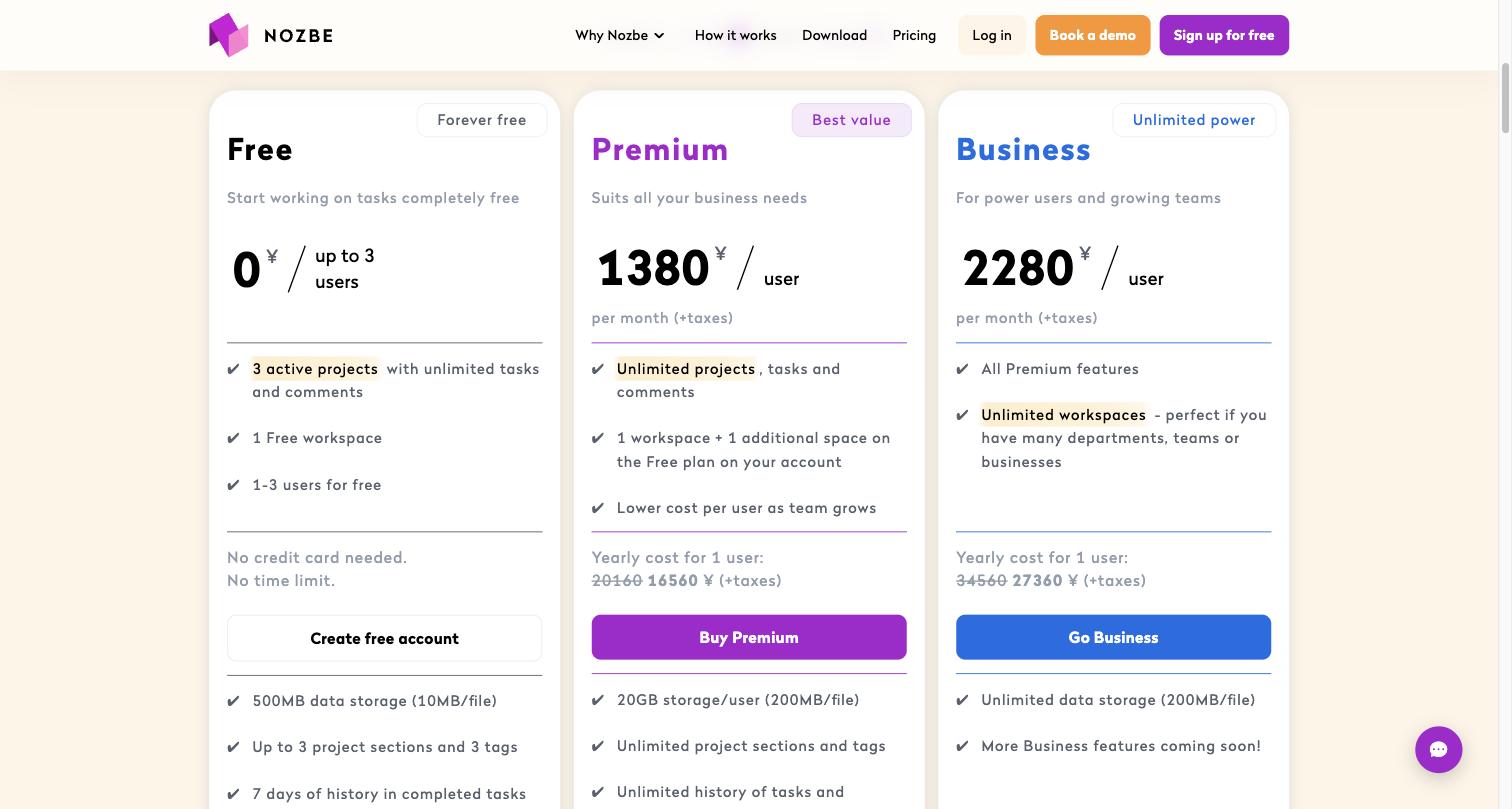
| Nozbe | Yes, permanent | Up to 3 users and 3 active projects, 500MB storage, 7-day task history — workable for one person’s ongoing work, tight the moment a team needs more than a few live projects |
| Todoist | Yes, permanent (Beginner) | 5 personal projects, 3 filter views, only 1 week of activity history — the project cap is the first thing most users hit |
| TickTick | Yes, permanent | 9 lists and 99 tasks per list, plus a working Pomodoro timer and habit tracker even on free — generous for a solo user, but only 1 file attachment per day |
| Things 3 | No ongoing free plan | Free trial only (Mac), full price required on every platform (iPad, iPhone) to keep using it after trying it |
| Asana | Yes, up to 2 users (Personal) | Unlimited tasks and projects for a 2-person team, but no timeline view, dependencies, or automation — and the cap is users, not features |
Todoist, TickTick, and Nozbe all give a genuinely usable free plan for a single person capturing and organizing their own work — the real constraints are project count and history length, not core functionality. Things 3 stands alone in offering nothing ongoing for free, which makes sense for a one-time-purchase app but is worth knowing before trying it on a whim. Asana’s free tier is really a 2-person trial run for the team product, not a long-term personal option.
How they compare on price
| Tool | Entry paid price | Longer-term option | What it’s really for |
|---|---|---|---|
| Nozbe | Premium: $7.50/member/mo billed monthly | Premium annual: $6/member/mo; Business annual: $9/member/mo (Business monthly: $11.25/member) | GTD-structured task and project management built to scale from one person to a 200-person team without switching tools |
| Todoist | Pro: $7/mo billed monthly | Pro annual: $5/mo; Business annual: $8/user/mo (Business monthly: $10/user) | The most flexible general-purpose task manager here, built to be configured into whatever system — GTD or otherwise — the user prefers |
| TickTick | Premium: $49.99/year (no separate monthly option on the official pricing page) | Same annual rate covers a shared list of up to 29 members | An all-in-one personal productivity app — tasks, calendar, Pomodoro timer, and habit tracking in one subscription |
| Things 3 | Mac: $49.99 one-time | iPad: $19.99 one-time; iPhone/Apple Watch: $9.99 one-time — no subscription on any platform | The most GTD-influenced structure of the five for a single Apple user who wants to pay once and never again |
| Asana | Starter: $13.49/seat/mo billed monthly | Starter annual: $10.99/seat/mo; Advanced annual: $24.99/seat/mo (Advanced monthly: $30.49/seat) | Full team work management with cross-project reporting, for when the need has genuinely outgrown a personal task list |
All prices above were checked directly against each vendor’s official pricing page, except Todoist’s, whose page renders its numbers via client-side script rather than static HTML — those figures were confirmed instead against multiple independent, recently updated third-party pricing trackers that converged on the same numbers, including a December 2025 price increase noted consistently across sources. Things 3’s prices are one-time purchases per platform, not monthly or annual rates, and there’s no bundle discount for buying more than one — each platform (Mac, iPad, iPhone) is priced and sold separately.
The breakdown, tool by tool
Nozbe
What it’s for: individuals and small teams who want to actually run a GTD system — not just capture tasks — and who might need that same tool to scale to a real team later without migrating everything to a different platform.
Pros
- The only tool in this comparison with an official, dedicated explainer for running Getting Things Done inside it, rather than GTD being a workflow a user has to build themselves out of generic labels and filters
- Scales from a free 3-person plan up to 200 people on the same product, so a solo GTD practitioner and a growing team aren’t on fundamentally different tools
- The 30-day money-back guarantee and 7-day trial (on creating a second space) make it low-risk to test the paid tiers against a real project, not a demo one
Cons
- Per-member pricing means the bill grows with every person added, unlike TickTick’s flat per-list model for small teams
- The free tier’s 3-project cap is tighter than Todoist’s 5-project free tier, so a free-tier user juggling more than a couple of ongoing efforts will hit the ceiling faster
- Each workspace (“space”) on the Premium plan is billed as a separate subscription, which is worth understanding before splitting personal and professional work into multiple spaces
Todoist
What it’s for: anyone who wants the most flexible, widely integrated task manager in this comparison and is comfortable spending a bit of setup time turning that flexibility into their own system, GTD-based or not.
Pros
- Labels, filters, and sub-projects are general-purpose enough to build a genuine GTD system (contexts as labels, a “Next Actions” filter, a Someday project) without fighting the tool’s defaults
- 90+ integrations on the Pro plan connect it to whatever calendar, email, or note-taking app a user already relies on
- The Business plan’s per-member pricing is the least expensive of the subscription-based team options in this group at matching headcounts
Cons
- There’s no default structure or onboarding path toward GTD specifically — a new user gets a blank project list and has to already know what system they’re building
- The free Beginner plan’s 5-project cap is the tightest of the three free task-manager tiers here, and its 1-week activity history makes reviewing past work difficult without upgrading
- Official pricing isn’t published as static text on the pricing page, which made this comparison rely on third-party trackers rather than the source directly — worth double-checking current rates before committing to annual billing
TickTick
What it’s for: someone who wants tasks, a calendar, a Pomodoro-style focus timer, and habit tracking bundled into one app and one subscription, rather than stitching together three or four separate tools.
Pros
- The built-in Pomodoro timer and habit tracker are genuinely part of the core app, not bolted-on afterthoughts, and both are usable even on the free plan
- Premium’s flat annual price covers a shared list of up to 29 members, meaning a growing small team doesn’t see the per-person cost climb that Nozbe or Todoist do
- The free tier’s 9 lists and 99 tasks per list is enough for most solo users to run a full task system without paying anything
Cons
- There’s no explicit GTD structure or guidance — it’s an all-in-one productivity app first, a task manager with GTD-compatible features second
- The official pricing page shows only an annual billing option; anyone who prefers to pay monthly won’t find that choice listed
- Collaboration tops out at 29 members even on Premium, so a team that outgrows that number needs a different tool entirely, unlike Todoist’s Business plan which scales much further
Things 3
What it’s for: a single Apple user (Mac, iPad, iPhone) who wants the GTD-influenced structure of Areas, Projects, Today, and Someday, and who would rather pay once per platform than commit to any subscription.
Pros
- No subscription on any platform — a one-time purchase per device is the only pricing model in this entire comparison with zero recurring cost
- The Areas → Projects → Today/Upcoming/Someday structure closely mirrors GTD’s own organizing principles, even though Cultured Code has never officially marketed it as a GTD app
- The interface is consistently cited as one of the cleanest and least cluttered task managers available, which lowers the friction of actually using it daily
Cons
- No collaboration features at all — there’s no shared project, no assigning tasks to someone else, and no path to add one even on the most expensive tier
- Available only on Apple platforms (Mac, iPad, iPhone, Apple Watch), so it’s not an option for anyone on Windows, Android, or a mixed-platform household or team
- Each platform is purchased separately, so a user who wants it on Mac and iPad and iPhone pays for all three individually rather than getting one license across devices
Asana
What it’s for: a team whose task management need has genuinely outgrown a single person’s GTD list and requires cross-project visibility, structured workflows, and reporting that none of the other four tools in this comparison are built to provide.
Pros
- Built for teams from the start, with cross-project reporting and Workflow Builder features none of the four personal-first tools in this comparison attempt to offer
- The 30-day free trial on both Starter and Advanced gives real time to test an actual team workflow before committing to a paid plan
- The interface is regularly cited as one of the cleaner, less cluttered options among full team work-management platforms specifically
Cons
- It’s the most expensive option in this comparison by a wide margin, and that expense buys team-scale features a solo GTD practitioner doesn’t need
- The free Personal plan caps out at 2 users, which stops being usable the moment a third person needs access — far more restrictive than Nozbe’s or Todoist’s free tiers
- Nothing about Asana is built around GTD specifically; a team wanting to run Getting Things Done as an organization would need to adapt Asana’s own project/task model rather than follow built-in guidance
Which one fits your situation
You’re one person trying to actually run a GTD system, not invent your own: Nozbe’s free plan, then Premium once a project or two pushes past the 3-project cap — it’s the only tool here that teaches the methodology as part of using the product.
You want maximum flexibility and don’t mind building your own system: Todoist. Its labels, filters, and sub-projects can become a GTD setup, a different methodology entirely, or something in between, and the integration list is the deepest of the five.
You want tasks, calendar, focus timer, and habit tracking without juggling separate apps: TickTick. The free tier alone covers most solo use cases, and Premium’s flat pricing is friendly to a small team that’s already found its rhythm together.
You’re fully on Apple devices, want the cleanest possible interface, and never want another subscription: Things 3 — accepting upfront that it will never support a second person on a shared project.
Your team has already outgrown a personal task list and needs real cross-project reporting: Asana, or a comparably team-first platform — none of the other four tools in this comparison are trying to solve that problem.
Not sure whether you need a personal GTD tool or a team platform: start with whichever free tier matches your actual headcount today — Nozbe, Todoist, or TickTick for one person, Asana’s 2-user Personal plan only if a second person is already involved — and let real usage over a couple of weeks answer the question a feature comparison can’t.
Common questions
Is Nozbe actually built for GTD, or does it just support it like the others? Nozbe is the only tool in this comparison with a dedicated, official GTD explainer (nozbe.com/gtd) and a workflow — Inbox, Projects, Priority — built explicitly around David Allen’s methodology. Things 3’s structure (Areas, Projects, Today, Upcoming, Someday) is also deeply GTD-influenced, but Cultured Code has never officially branded it as a GTD app. Todoist and TickTick can both be configured to run a GTD system using labels, filters, and contexts, but neither ships with GTD as the default mental model.
Which of these actually work for a team, not just one person? Nozbe and TickTick both support real multi-person collaboration — Nozbe up to 200 people on paid plans, TickTick’s Premium tier up to 29 members on a shared list. Todoist’s Business plan scales much further (up to 1,000 team members). Things 3 has no collaboration features at all; it’s built as a single-user app across Mac, iPhone, and iPad with no shared-project mode. Asana is built for teams from the ground up and is the only one of the five with real cross-team reporting.
Do I need to pay anything to actually use GTD-style task management? No — Todoist’s free Beginner plan, TickTick’s free plan, and Nozbe’s free plan (up to 3 users and 3 active projects) are all real, permanently usable options, not time-limited trials. Things 3 is the exception: there’s no ongoing free tier, only a free trial on Mac before the one-time purchase. Which free plan is actually enough depends more on project count and history length than on GTD-specific features, since all three free tiers include the core capture-and-organize workflow.
Why is Things 3 a one-time purchase when everything else here is a subscription? Cultured Code, the company behind Things 3, has kept it as a paid-upfront app on every platform since it launched, rather than moving to a subscription model the way most productivity software has. The tradeoff is real: no ongoing collaboration or team features are being built into a subscription revenue stream, and each platform (Mac, iPad, iPhone) is a separate purchase. For a single user who only needs Apple devices and wants to pay once, it’s the only tool in this comparison without a recurring bill at all.
What does Nozbe’s per-member pricing actually cost for a small team? On the annual Premium plan, a 5-person team pays $30/month total ($6/member/month); on Business, the same team pays $45/month ($9/member/month) for unlimited workspaces and unified billing across them. That’s meaningfully higher than Todoist’s Business tier at the same headcount ($40/month at $8/user/month annual) only once a team needs Nozbe’s project-and-time-tracking depth specifically — for a team that just needs shared task lists, Todoist Business or TickTick Premium’s flat per-list pricing usually costs less.
Where to start
The fastest way to tell which of these actually fits is to run one real week of work through it, not a test list of “buy milk” and “call dentist.” Capture everything that actually crosses your desk for a few days — meeting follow-ups, half-formed project ideas, things someone else is waiting on you for — and see whether the tool’s structure makes it obvious what to do next, or whether it just becomes another place things pile up unprocessed.
For anyone specifically trying to adopt Getting Things Done as a practice rather than reverse-engineer it from a flexible tool, Nozbe’s free plan is the lowest-friction way to start — the GTD-aligned workflow is there by default, so the first week is about learning the method, not configuring software to support it. If a personal system stops being enough because a team needs to see the same work, that’s the specific point to look at Asana instead, rather than trying to stretch a personal GTD tool past what it was built for.